Television has come a long way from rabbit ears and cable boxes. Today, millions of people are cutting the cord and switching to a smarter, more flexible way to watch their favorite shows, live sports, and on-demand movies — and it all starts with understanding IPTV.
In fact, the global IPTV market was valued at around $68.84 billion in 2023 and is projected to reach over $200 billion by 2030, highlighting the massive shift toward internet-based TV
Whether you have heard the term in passing or are actively considering making the switch, this guide will walk you through everything: what IPTV is, how it works, the different types available, the devices it supports, and why it is rapidly becoming the go-to choice for modern viewers worldwide.
What Is IPTV?
IPTV stands for Internet Protocol Television. In plain terms, it is a system that delivers television content over the internet rather than through traditional broadcast signals, satellite dishes, or cable lines.
Instead of relying on a physical cable plugged into your wall or a dish on your roof, IPTV sends video content as data packets over an IP (Internet Protocol) network — the same technology that powers your email, web browsing, and video calls. The result is a television experience that is faster, more flexible, and packed with far more content options than anything traditional TV can offer.
Think about how you browse the web — you request a page and it loads instantly. IPTV works on a similar principle. When you select a channel or press play on a video, the content is streamed to your device in real time over your internet connection. This on-demand, two-way interactivity is one of the key features that sets IPTV apart from everything that came before it. The term ‘IPTV’ itself was coined in the mid-1990s, but the technology only went mainstream once fast broadband internet reached millions of homes.

How Does IPTV Work
Understanding the mechanics of IPTV helps you appreciate why it is such a powerful upgrade over conventional television. Here is a step-by-step breakdown of what happens when you press play:

Content Is Sourced
Television programs, live events, movies, and on-demand videos are gathered from broadcasters, studios, and content libraries by the IPTV provider.
Encoding and Compression
Raw video content is converted into compressed digital data using video codecs. This reduces file sizes without compromising quality, making transmission over the internet practical and efficient.
Delivered via Dedicated Servers
The compressed data is stored and managed on powerful IPTV servers. These servers use a method called unicasting (sending individual streams to each viewer) to deliver content directly to the person requesting it, using significantly less bandwidth than traditional broadcasting. For popular live broadcasts, many providers also use multicasting — a one-to-many method that sends a single stream to thousands of viewers at once, which is how servers handle major live events without overloading.
Transmitted Over Your Internet Connection
The video data is broken into small packets and sent through your broadband connection — fiber optic, DSL, or cable internet — to your home network.
Decoded on Your Device
A compatible device — whether a smart TV, smartphone, tablet, computer, or set-top box — receives the data packets, reassembles them, and displays the content on your screen in real time.
Unlike traditional broadcasting where every channel is constantly pushed downstream to all viewers simultaneously, IPTV only sends you the channel or program you have actually requested. This makes the system far more efficient, and it enables features like pause, rewind, and on-demand playback that traditional TV simply cannot offer natively.
Types of IPTV Services
IPTV is not a one-size-fits-all technology. There are several distinct service types, each catering to a different viewing preference:
Live Television
Real-time broadcasting of channels and events as they happen — news, sports, entertainment, and more, delivered live over the internet.
Video on Demand (VOD)
Access a library of movies, series, and shows on your schedule. You choose what to watch and when — no waiting for a scheduled broadcast.
Time-Shifted TV
Also known as catch-up TV, this lets you watch content that was broadcast in the recent past — typically within a window of several days after the original air date.
TV on Pause (Start Over)
Pause, rewind, and restart live TV in real time without needing a physical recording device or cloud storage subscription.
Near Video on Demand (NVoD)
Scheduled broadcasts of the same content at staggered time slots, giving viewers more opportunities to catch the beginning of a feature or event.
Interactive TV
Two-way engagement features such as voting, in-program purchases, caller ID overlays, and integrated applications layered on top of live broadcasts.
What Can You Watch on IPTV?
A quality IPTV subscription packs in far more than live TV. Here is a taste of the content categories most good services include:
- Live news and entertainment channels from dozens of countries and regions
- Live sports coverage — football, basketball, tennis, combat sports, motorsports, and more
- Premium movie channels plus large on-demand film and series libraries
- Children’s programming and educational content
- Documentary and factual channels
- International programming in multiple languages — especially valuable for viewers following channels from other countries
- Niche interest channels covering cooking, travel, history, and lifestyle
That breadth of content is a big part of why IPTV has become the go-to choice for cord-cutters: one subscription can replace cable, a sports package, and several streaming services at once.
IPTV vs. Traditional TV
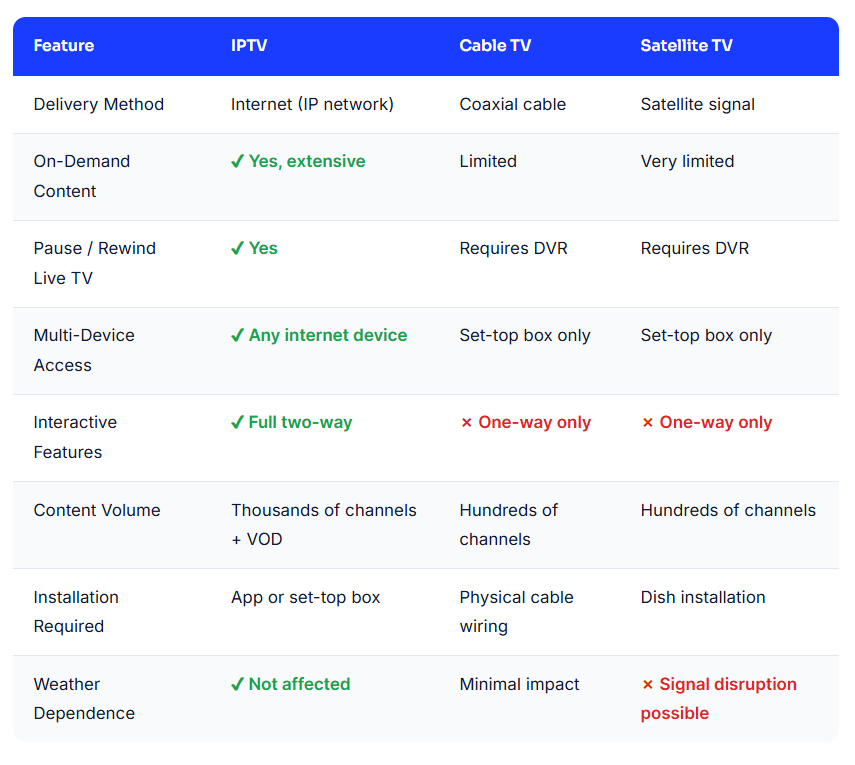
One of the best ways to understand what makes IPTV so compelling is to compare it directly with the television technologies most people grew up with.
Key Benefits of IPTV
The popularity of IPTV is no accident. It addresses nearly every frustration viewers have had with traditional television for decades. Here are the most compelling advantages:
Watch on Your Schedule
No more planning your evening around a broadcast time. VOD and time-shift features put you in control.
Access Anywhere
Watch on your TV at home, then continue on your phone during the commute — seamlessly across all devices.
Massive Content Library
85,000+ live channels and on-demand titles spanning every genre, language, and region.
Interactive Experience
Two-way connectivity enables features impossible on cable — in-program apps, caller ID, and live polls.
Cost-Effective
Get far more content at a lower price point than bundled cable packages — with no long-term contracts or hidden fees.
High-Definition Quality
With a reliable broadband connection, IPTV supports HD, Full HD, and even 4K streaming with crystal-clear picture quality.
Compatible Devices for IPTV
One of IPTV’s greatest selling points is its broad device compatibility. As long as a device can connect to the internet and run an IPTV application, you can watch your content on it. Common compatible devices include:
- Smart TVs — Most modern smart TVs have built-in IPTV support or can run IPTV apps directly.
- Set-Top Boxes — Dedicated IPTV boxes, as well as streaming sticks and media players, connect your TV to the internet and handle all decoding.
- Smartphones and Tablets — Watch live TV or on-demand content from anywhere using iOS or Android apps.
- Laptops and Desktop Computers — Access IPTV through a web browser or dedicated software application.
- Gaming Consoles — Many modern consoles can run IPTV streaming applications.
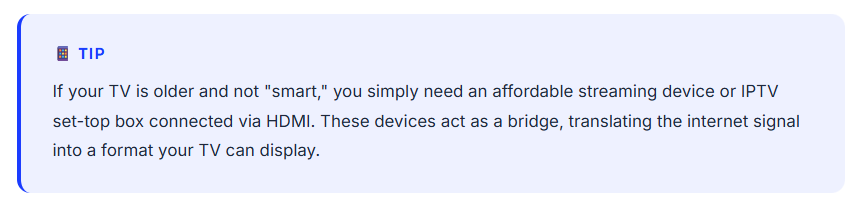
- Older TVs — Connect an HDMI-enabled streaming device or set-top box to give any TV IPTV capability.
For step-by-step setup on the two most popular platforms, see our Firestick guide and our Smart TV guide.
What You Need to Get Started with IPTV
Getting started with IPTV is easier than most people expect. Here is everything you will need:
A Stable High-Speed Internet Connection
A minimum of 10–25 Mbps is recommended for HD streaming. For 4K content or multiple simultaneous streams, 50 Mbps or higher is ideal. Fiber broadband offers the best and most consistent experience.
A Compatible Device
A smart TV, streaming stick, set-top box, computer, or smartphone — essentially any internet-connected screen will work. No specialist hardware is required in most cases.
An IPTV Subscription
You will need an active subscription from a reputable IPTV service provider. This gives you access to the channel lineup, VOD library, and platform features.
An IPTV App or Player
Most providers supply a dedicated app or recommend compatible media players. Once installed and your subscription credentials are entered, you are ready to stream.
How to Choose a Reliable IPTV Provider
Your provider choice matters more than any device or app — it decides your stream quality, reliability, and the support you get when something breaks. Use this checklist before you commit:
- Channel quality over channel quantity: confirm the specific channels and sports packages you actually watch are available in stable HD or 4K — a huge channel count means little if your favorites buffer.
- Server reliability: look for 99%+ uptime guarantees backed by redundant servers, so streams survive peak hours and major live events.
- Included EPG: an electronic program guide should come with the subscription, not cost extra.
- VOD library depth: check that the movie and series catalog is large and updated regularly with new titles.
- Simultaneous connections: make sure the plan supports enough devices for everyone in your household.
- Responsive customer support: real help via chat or messaging when something goes wrong — avoid providers with no visible way to reach them.
- Trial availability: a reputable provider lets you test stream quality before you commit to a longer plan.
Choosing the Right IPTV App
The app is the remote control for your whole experience. Most IPTV players are free — you simply enter your subscription credentials. The most popular options include:
- IPTV Smarters Pro — beginner-friendly, supports M3U playlists and Xtream Codes logins, with EPG support; available on Android, iOS, and Fire TV.
- TiviMate — widely regarded as the best player for Android TV, with an excellent on-screen TV guide and optional premium features such as recording.
- GSE Smart IPTV — a solid cross-platform choice for iOS and Android.
- VLC Media Player — not built for IPTV specifically, but it loads M3U playlists on virtually any platform and works well as a quick backup.
- Kodi with an IPTV add-on — a highly customizable open-source media center with a steeper learning curve.
Stick to well-known apps from official app stores — random players from unknown sources can put your device and privacy at risk.
Quick IPTV Setup Walkthrough
Once your internet, device, subscription, and app are ready, getting started takes just a few minutes:
- Test your internet speed. Aim for at least 25 Mbps for smooth HD streaming — 50 Mbps or more is ideal for 4K or multiple devices at once.
- Subscribe to a provider and keep your credentials handy. You will receive either an M3U playlist URL or an Xtream Codes login (server URL, username, and password) — see our Xtream Codes guide if you are unsure which you have.
- Install your IPTV app from your device’s official app store. For device-specific walkthroughs, see our Firestick guide and our Smart TV guide.
- Open the app and enter your credentials — paste the M3U URL or type in your Xtream Codes login details.
- Wait for your channel list to load. This only happens once and can take a minute or two.
- Organize your channels — build a favorites list, group channels by category, and set up your EPG so you always know what is on.
Then press play and enjoy. If anything buffers or fails to load later, the cause is almost always connection or server related — not your setup. For detailed walkthroughs, see our Xtream Codes setup guide, Firestick installation guide, and Smart TV installation guide.
Pros and Cons of IPTV
Like any technology, IPTV comes with genuine strengths and a few limitations worth knowing upfront. Here is an honest look at both sides:
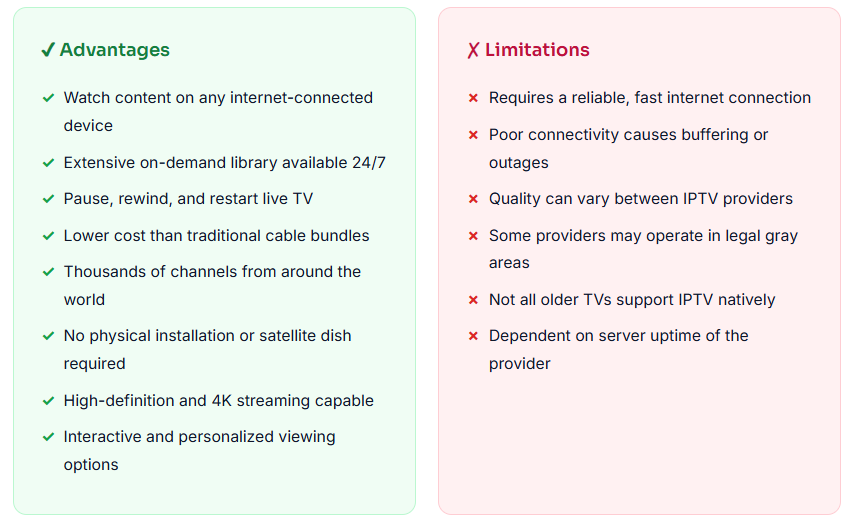
Pros:
- Watch on your schedule with video on demand and time-shifted TV
- Access content anywhere on TVs, phones, tablets, and computers
- 85,000+ live channels and on-demand titles
- More cost-effective than bundled cable packages
- High-definition and 4K streaming quality with a reliable connection
Cons:
- Requires a stable high-speed internet connection (10–25 Mbps for HD)
- Picture quality can drop during peak hours or on slow connections
- You need a paid subscription from a reliable IPTV provider
The limitations of IPTV are largely manageable. A reliable internet connection and a trustworthy, reputable provider like IPTV Smarter Pros will eliminate most of the potential downsides and deliver a consistently excellent experience.
The Future of IPTV
IPTV is not just a trend — it is the future of television. As global internet infrastructure continues to improve and broadband speeds increase, the advantages of IP-based television delivery only grow stronger. Several developments are shaping what lies ahead:
- 5G expansion is dramatically improving mobile streaming quality, making IPTV viable even on wireless networks away from home.
- AI-powered personalization is enabling IPTV platforms to learn viewing habits and serve smarter recommendations and curated content feeds.
- 4K and 8K streaming are becoming standard expectations, and IPTV is better positioned than satellite or cable to deliver these resolutions reliably.
- Cloud DVR and storage are removing the need for any physical recording equipment entirely.
- Immersive experiences — including VR-compatible live sports broadcasts and interactive second-screen features — are emerging from pioneering IPTV providers.
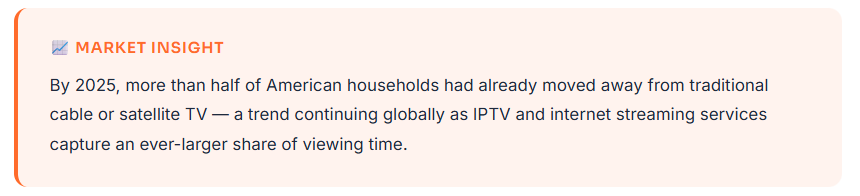
Traditional cable and satellite subscriptions are declining year after year. IPTV, by contrast, is growing rapidly across every major market. The global shift toward on-demand, internet-delivered content is not a temporary trend — it is a fundamental change in how the world watches television.
Experience the IPTV Smarter Pros Difference
At IPTV Smarter Pros, we make it simple to upgrade your entertainment experience. We provide a premium, fully managed IPTV service built around reliability, content variety, and dedicated support — so you spend more time watching and less time troubleshooting.
85,000+ Live Channels
Access live TV across news, sports, entertainment, kids, international, and more — all in one place.
Massive VOD Library
Browse an extensive on-demand library of movies and series updated regularly with new titles.
HD & 4K Streaming Quality
Crystal-clear picture quality on every screen, whether you are watching on a large TV or a smartphone.
Multi-Device Support
Use your subscription on smart TVs, smartphones, tablets, computers, and set-top boxes simultaneously.
99.9% Server Uptime
Our infrastructure is optimized for stability so your streams stay smooth, even during peak viewing hours.
Easy Setup & Onboarding
We guide you through every step — from installation to your first channel — with hands-on support.
Dedicated Customer Support
Real people ready to help whenever you need it, ensuring you are never left without answers.
Flexible Subscription Plans
Choose a plan that fits your lifestyle and budget, with no long-term contracts or hidden fees. Browse our pricing plans to find the perfect fit.
Conclusion
IPTV represents the natural evolution of television — shifting from a passive, schedule-driven broadcast experience into an interactive, on-demand, multi-device platform that puts the viewer firmly in control. As internet infrastructure improves globally and consumer expectations continue to rise, IPTV’s advantages over traditional TV will only become more pronounced.
Whether you are looking to replace a costly cable subscription, access international content unavailable in your region, or simply enjoy a more flexible and modern TV experience, IPTV is the most compelling solution available today.
Ready to make the switch? Book a free call with IPTV Smarter Pros and discover just how easy and affordable it is to transform the way you watch television. Prefer to test it yourself first? Grab a free 24-hour trial and experience the difference.
FAQs
Is IPTV legal to use?
IPTV technology itself is entirely legal. The legality depends on the specific provider and whether they have obtained the proper broadcasting licenses for the content they distribute. Legitimate IPTV providers — like IPTV Smarter Pros — operate within legal frameworks and hold the necessary rights for the content they offer. Always choose a reputable, authorized provider to ensure you are watching content legally and safely.
How much internet speed do I actually need for smooth IPTV streaming?
The exact speed you need depends on the resolution you want to stream. Standard definition (SD) content works at around 5 Mbps, HD streaming comfortably runs at 10–25 Mbps, and Full HD or 4K content performs best at 25–50 Mbps or higher. If you plan to stream on multiple devices simultaneously, multiply your per-stream requirement accordingly. A fiber broadband connection is ideal for the most consistent experience, though high-quality cable broadband works well too.
Can I use a VPN with IPTV, and should I?
Yes, a VPN can be used alongside IPTV for added privacy and, in some regions, to access content that may be restricted by your internet service provider. However, using a VPN can also reduce your streaming speeds if the VPN server is slow or overloaded. If your IPTV provider or the content you want to access is available in your region without any restrictions, a VPN is not strictly necessary. Always verify that your chosen IPTV service supports VPN connections before relying on one.
What is the difference between IPTV and OTT (Over-the-Top) services?
While both IPTV and OTT deliver video over the internet, they differ in how they operate. IPTV typically runs over a managed, private network controlled by a telecom provider or service operator, giving them direct control over quality, bandwidth, and uptime. OTT services, by contrast, are delivered over the open public internet with no quality guarantees at the network level. This means IPTV can offer more consistent quality of service, especially for live broadcasts, while OTT platforms like general streaming services are more dependent on your public internet connection’s reliability.
Can I record programs with IPTV just like a traditional DVR?
Many IPTV services offer a cloud-based DVR (digital video recorder) feature that allows you to record live programs for playback at a later time — all without needing any physical hardware. The recordings are stored on the provider’s servers rather than a local device. The availability of this feature depends on your specific IPTV subscription plan. In addition, the time-shifted TV and catch-up features available on most IPTV services already reduce the need for manual recording in many situations.
How many devices can I use with a single IPTV subscription?
The number of simultaneous connections allowed varies by provider and plan. Entry-level subscriptions typically allow one or two simultaneous streams, while premium plans can support multiple streams at the same time — ideal for households where different family members want to watch different content on different devices. IPTV Smarter Pros offers flexible plans to match different household sizes and viewing needs. It is always worth checking the simultaneous connection limit before selecting your plan.
What should I look for when choosing an IPTV provider?
When evaluating an IPTV provider, focus on six key factors: server reliability and uptime guarantees, the size and quality of the channel and VOD library, customer support responsiveness, device compatibility, transparent pricing without hidden fees, and evidence of legitimate content licensing. A trustworthy provider will be transparent about what is included in each plan and will offer genuine technical support when you need it. Avoid providers that seem unusually cheap with no explanation — rock-bottom pricing is often a sign of unlicensed content or unreliable infrastructure.
How do I switch IPTV providers without losing my setup?
Switching providers is straightforward: get your new provider’s M3U URL or Xtream Codes credentials, then open your IPTV app and replace or add the new playlist. Most apps let you manage multiple playlists at once, so you can test the new service before removing the old one. Your device settings, favorites, and app preferences usually carry over untouched.
Will IPTV work if my internet goes down?
No. IPTV is delivered entirely over the internet, so a loss of connectivity means a loss of access to channels and on-demand content until your connection returns. This is why a stable — preferably wired — connection is recommended for your main TV.
Can I watch IPTV while traveling abroad?
Usually, yes — your subscription works anywhere you have a reliable internet connection. The exception is geo-restricted channels, which some providers limit to specific countries for licensing reasons. A VPN with a server in your home country can often resolve that.
Do I need a special router or modem to use IPTV?
In most cases, no. Any standard home router with a reliable connection will do. If you stream in 4K or run several simultaneous streams, a router that supports modern Wi-Fi standards (Wi-Fi 5 or Wi-Fi 6) helps — and a wired Ethernet connection to your streaming device is always more stable than Wi-Fi.
How do IPTV providers handle major live events with millions watching?
Quality providers invest in content delivery networks (CDNs) and technologies like multicasting to spread load across servers in different regions. Your stream is routed to the nearest server, which keeps buffering low even during globally watched events — and providers with strong uptime guarantees reroute traffic automatically if one server fails.
What should I do if my IPTV service goes down or a channel stops working?
If a single channel fails, reload your playlist inside the app to refresh the stream links. If many channels fail or the problem lasts more than a few hours, contact your provider’s support — reputable providers monitor their servers around the clock and can confirm whether the issue is on their end.