Television has changed more in the past decade than in the previous fifty years. At the heart of that transformation is one technology: IPTV. Whether you are a cord-cutter, a streaming enthusiast, or simply curious about your options, this guide explains everything from the ground up.
According to Statista, the number of IPTV subscribers worldwide surpassed 1.5 billion in recent years, showing just how rapidly viewers are moving toward internet-based television services.
What Is an IPTV Service?
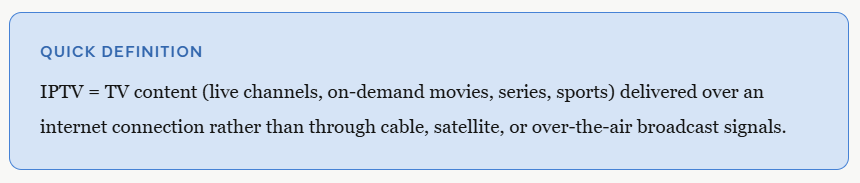
IPTV stands for Internet Protocol Television. Instead of receiving TV signals through a traditional antenna, a cable coaxial line, or a satellite dish, IPTV delivers video content directly over the internet using the same data protocols that power websites, emails, and video calls.
In plain terms: rather than a broadcaster pushing a signal to everyone at the same time, an IPTV service sends video directly to your device on demand — or as a live stream — through your broadband or mobile internet connection.
The term was coined in the mid-1990s, but mainstream IPTV services only became viable once fast broadband internet reached millions of homes. Today it is one of the fastest-growing segments of the global media industry.
How Does The IPTV Service Work?
To understand IPTV, it helps to picture the journey a video takes from the source to your screen.
Step 1 — Content is acquired
An IPTV provider licenses content from broadcasters, sports leagues, film studios, and news networks. This content is stored on powerful media servers.
Step 2 — Content is encoded and compressed
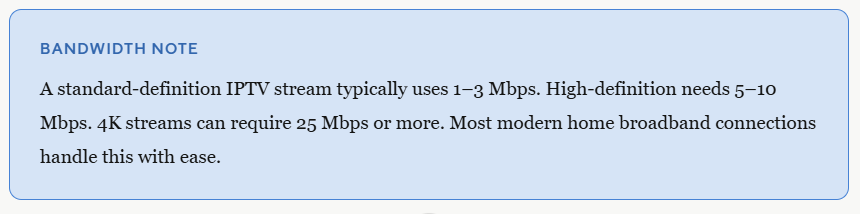
Raw video is encoded into digital formats such as H.264 or H.265 and compressed so it can travel efficiently over a network. This is why a high-definition IPTV stream requires far less bandwidth than you might expect.
Step 3 — Content is delivered over IP networks
The encoded video is broken into small data packets and sent across the internet to your router. Two delivery methods are common:
- Unicast — a one-to-one connection between the server and your device, typically used for on-demand content.
- Multicast — a one-to-many broadcast used for live channels, reducing server load when thousands of people watch the same stream simultaneously.
Step 4 — Your device decodes and plays the stream
A dedicated IPTV Smarters app, a smart TV, a set-top box, or any compatible player reassembles the data packets and renders them as the video you watch. The whole process happens in milliseconds.
Types of IPTV Services
Not all IPTV services are the same. There are three main delivery models, and many providers offer all three in a single subscription.
Live IPTV
Channels broadcast in real time — news, sports, entertainment — just like traditional TV but delivered over the internet.
Video on Demand (VOD)
A library of movies, documentaries, and TV series you can watch at any time, pausing and rewinding as you please.
Time-Shifted TV
Watch previously aired programmes after they have broadcast — sometimes called “catch-up TV” or an electronic programme guide (EPG) with a replay function.
Some services also include a Network Personal Video Recorder (NPVR) feature, allowing you to schedule recordings that are stored in the cloud rather than on a physical device.
IPTV vs. Traditional TV
To appreciate what IPTV offers, it is worth comparing it to the technologies it is gradually replacing.
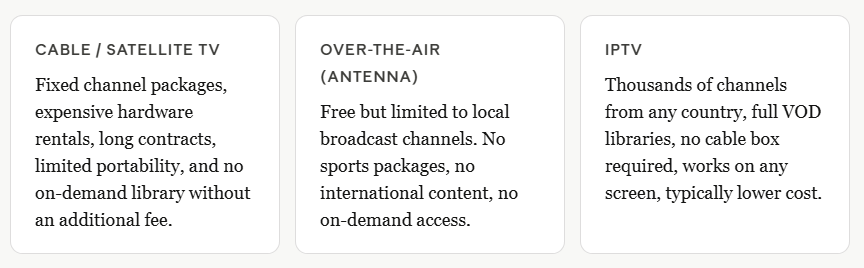
The core advantage of IPTV is flexibility. You are not tied to a cable provider’s schedule, you are not paying for channels you never watch, and you are not restricted to one room with one television set.
What Can You Watch With an IPTV Service?
The breadth of content available through IPTV is one of its most compelling selling points. A quality IPTV service can provide access to:
- Thousands of live TV channels from dozens of countries and regions
- International news networks in multiple languages
- Live sports events — football, basketball, tennis, combat sports, motorsport, and more
- Premium movie channels and blockbuster film libraries
- Children’s programming and educational content
- Documentary and factual channels
- Adult entertainment channels with appropriate access controls
- Niche interest channels covering cooking, travel, history, and lifestyle
The availability of international content is particularly valuable for diaspora communities or anyone who wants to follow sports leagues and programmes from other parts of the world without paying for expensive international packages.
What Devices Support IPTV?
One of the most practical advantages of IPTV is device compatibility. Because it uses standard internet protocols, almost any internet-connected screen can become an IPTV receiver. Compatible devices typically include:
- Smart TVs (most major brands have native IPTV app support)
- Amazon Fire TV Stick and Fire TV Cube
- Android TV boxes and Android smartphones/tablets
- Apple TV, iPhone, and iPad (via compatible apps)
- Windows and Mac computers using a player application
- Dedicated IPTV set-top boxes
- Mag boxes and similar specialist hardware
- Roku devices (via compatible channels or sideloading)
This means a single IPTV subscription can serve your living room television, the tablet in the bedroom, and the phone in your pocket — simultaneously, on separate streams, depending on the plan you choose.
What to Look for in an IPTV Service
With hundreds of providers on the market, choosing the right IPTV service requires evaluating several key factors:
Channel count and content library
More channels is not always better if quality is poor. Look for a provider that offers the specific channels, sports packages, and VOD content relevant to your interests, delivered at consistent quality.
Stream quality and resolution
A reputable service should offer HD and 4K streams where available, with minimal buffering. Ask whether streams are SD, HD, or FHD as a default, and whether 4K content is included.
Server stability and uptime
Nothing ruins a live football match like buffering. Look for providers that advertise high uptime guarantees — 99% or better — and maintain multiple redundant server locations.
Electronic Programme Guide (EPG)
A well-organised EPG makes navigation intuitive and lets you plan ahead. A poor or missing EPG is a significant usability drawback.
Number of simultaneous connections
If you have multiple TVs or want family members to watch different content at the same time, confirm how many simultaneous streams are included in your subscription.
Customer support
Technical issues do arise. Responsive, knowledgeable support — ideally available around the clock — is a major differentiator between providers.
Trial options
A legitimate, confident IPTV provider will typically offer a trial period or a short-term subscription so you can evaluate stream quality and channel availability before committing to a longer plan.
Is IPTV Legal?
This is one of the most common questions people ask, and the answer is nuanced.
IPTV as a technology is entirely legal. Many legitimate broadcasters, telecoms companies, and streaming platforms use IPTV infrastructure to deliver their services.
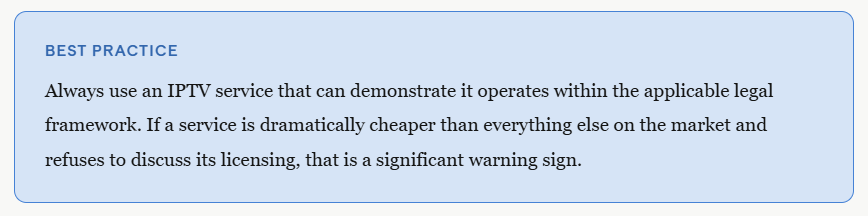
The legality of a specific IPTV service depends on whether that service has properly licensed the content it distributes. Licensed IPTV services that have acquired the rights to broadcast the channels and programmes they carry are legal in the jurisdictions where they operate.
Unlicensed IPTV services — those that redistribute copyrighted content without authorisation — operate in a legal grey area or are outright illegal depending on local law. Users of such services may also face legal risk in some jurisdictions.
Why Choose IPTV Smarter Pros?
IPTV Smarter Pros was built for viewers who expect more — more channels, more stability, and more genuine support from a team that cares about their experience.
What We Offer
- 20,000+ live channels — Covering sports, news, entertainment, and international content from over 50 countries, all in one subscription.
- Extensive VOD library — Thousands of movies and TV series available on demand, updated regularly with new releases.
- HD, FHD & 4K streams — Crystal-clear picture quality on every compatible device, with adaptive bitrate technology that adjusts to your connection.
- 99.9% uptime guarantee — Multiple redundant servers ensure you stay connected even during peak viewing times and major live events.
- Full EPG support — An organised, up-to-date electronic programme guide so you always know what is on and what is coming up next.
- Multi-device compatibility — Works on Smart TVs, Fire Stick, Android, iOS, Windows, Mac, and dedicated IPTV boxes — up to 5 simultaneous connections.
- Catch-up TV & cloud recording — Never miss a programme again with time-shifted playback and NPVR functionality.
- 24/7 dedicated customer support — Our team is available around the clock via live chat and ticket to resolve any issue quickly.
- Flexible subscription plans — Monthly, quarterly, and annual options to suit every budget, with a trial available so you can experience the service before committing.
- Easy, guided setup — Our onboarding team walks every new subscriber through installation step by step, no technical knowledge required.
Ready to upgrade your TV experience? Book a free call with our team and we will walk you through everything — channel selection, device compatibility, pricing, and setup — with no pressure and no jargon.
Conclusion
IPTV is not a passing trend — it is the direction the entire television industry is heading. By delivering live channels, on-demand content, and time-shifted programming over a standard internet connection, IPTV offers a level of flexibility, variety, and value that cable and satellite simply cannot match.
Whether you are looking to cut the cord entirely, add an international channel package, or simply find a more convenient way to watch your favourite content on any screen in your home, IPTV is worth serious consideration. The key is choosing a provider that prioritises quality, reliability, and genuine customer service.
FAQs
Do I need a special router or modem to use IPTV?
In most cases, no. Any standard home router that provides a reliable internet connection is sufficient for IPTV. However, if you intend to watch 4K streams or run multiple simultaneous connections, it is worth ensuring your router supports modern Wi-Fi standards such as Wi-Fi 5 (802.11ac) or Wi-Fi 6. A wired Ethernet connection to your streaming device will always provide more stability than Wi-Fi, particularly for live sports events.
Can I use IPTV while travelling abroad?
Yes. Because IPTV relies on your internet connection rather than a physical cable or satellite signal, you can access your subscription from virtually anywhere in the world as long as you have a stable broadband or mobile data connection. Some content may be subject to geo-restrictions depending on licensing agreements, so it is always worth confirming with your provider which channels and VOD titles are available internationally.
How is IPTV different from standard streaming platforms like Netflix?
Standard video-on-demand platforms typically offer only pre-recorded content from their own licensed library — there are no live TV channels or real-time broadcasts. IPTV, by contrast, combines live television (thousands of channels from around the world, including live sports and news), on-demand libraries, and catch-up functionality in a single service. IPTV is effectively a full television replacement, whereas conventional streaming platforms are supplemental entertainment services.
What happens to my IPTV stream if my internet goes down?
If your internet connection is interrupted, your IPTV stream will pause or stop until connectivity is restored. Unlike cable or satellite signals, IPTV is entirely dependent on your broadband connection. For this reason, it is advisable to have a reliable internet service provider and, if possible, a wired connection for your primary viewing device. Most modern IPTV players will automatically attempt to resume playback once connectivity is re-established.
Is there a difference between an M3U playlist and an IPTV app?
An M3U playlist is a simple text file containing a list of stream URLs that point to IPTV channels or VOD content. It is the most widely supported format for sharing IPTV channel lists. An IPTV app (or player) is the software that reads the M3U file and presents the content in a user-friendly interface, complete with channel guides, search functionality, and playback controls. Most IPTV subscriptions provide either an M3U link or a dedicated app — many providers support both to maximise device compatibility.
Can I watch IPTV without a smart TV or streaming stick?
Yes. A standard television can be turned into an IPTV-ready screen by connecting an Android-based media player, a dedicated IPTV set-top box, or a streaming stick to its HDMI port. Even an older television with no “smart” features can support IPTV through one of these affordable add-on devices. Alternatively, you can watch on a laptop, desktop computer, tablet, or smartphone without needing a television at all.
How do IPTV providers handle major live events when millions of people watch simultaneously?
Quality IPTV providers invest heavily in server infrastructure to handle traffic spikes during peak events such as major sporting finals or globally watched broadcasts. Technologies such as content delivery networks (CDNs) and multicast streaming distribute the load across multiple server nodes in different geographic locations. This means your stream is typically routed to the server nearest you, reducing latency and minimising the risk of buffering even when demand is at its highest. Providers with a 99.9% uptime guarantee maintain redundancy so that if one server experiences issues, traffic is automatically rerouted.